AI card grading, explained
Use a condition estimate to take a closer look at your Pokémon and other trading cards. Learn what the evidence can tell you—and where a photograph has limits.
What AI card grading can tell you
AI card grading uses photographs to estimate a trading card’s condition. Instead of starting with a single number, a useful assessment looks at the evidence: where the printed design sits, whether corners retain their shape, how edges look, and what is visible on the surface. GemiScan organizes these findings into a report that you can compare with the original images. The purpose is to make your own inspection more informed and repeatable.
An AI estimate is different from submitting a physical card to a professional grading company. A photograph does not let the reviewer handle the card, change its angle freely, or examine every detail under controlled lighting. GemiScan does not issue an official PSA, BGS or CGC grade, authenticate a card, or guarantee a future submission result. Similar numbers on different systems should not be treated as interchangeable certificates.
This makes a card grading app useful before a submission, while organizing a collection, or when recording the visible condition of a particular copy. It is less useful when the available photographs conceal the very detail you need to check. If you cannot see a corner clearly, a confident-looking number does not create the missing evidence. Keep the images and the written findings together when deciding how much weight to place on an assessment.
How a GemiScan assessment works
Start with the actual card you want to inspect. Capture its front and back, keeping the card flat and the camera as square to it as possible. Use the capture guides to keep the edges in frame and check focus before continuing. The two faces provide different information: a bright illustration can conceal a mark that is more obvious against the back border, while front and back centering can differ substantially.
The app uses the scan and available centering measurements to prepare an online assessment. The report covers four components: centering, corners, edges and surface. Read the component findings before looking at the final grade. If a finding refers to a mark, return to that part of the image and check whether you can distinguish damage from glare, sleeve texture, dust or the card’s printed design.
For a completed assessment in the current grading implementation, the overall Gemi Grade is the lowest of the four required subgrades. It is not their arithmetic average. For example, component scores of 10, 9, 10 and 8 produce an overall score of 8. A missing or rejected assessment is not the same thing as a low grade: there may be insufficient evidence to produce a usable result.
Centering: compare opposing borders
Centering describes how evenly the design sits between the card’s outer edges. Compare left with right, then top with bottom, and repeat that process on the reverse. Equal opposing widths give a 50/50 ratio. If one border measures three units and the opposite border measures two, the ratio is 60/40. The units can be millimetres or pixels, provided each opposing pair uses the same scale and measurement method.
The difficult part is often choosing a consistent reference. Some cards have decorative frames, full-art designs, irregular inner lines or artwork that deliberately looks asymmetric. Do not measure from two unrelated details just because they are easy to see. A photograph taken at an angle can also make a physically even card appear uneven. If the card looks trapezoidal, improve the capture before relying on the apparent border widths.
A good centering result does not establish a high overall grade. Corners, edges and surface still need inspection, and grading companies apply their own criteria. Use the free centering calculator to understand the arithmetic and compare your measurements. Keep the front and back results separate rather than averaging them into a number that hides which face or direction is less balanced.
Corners: inspect all eight views
Each of the four corners has a front and a back view. Look for rounding, bends, compressed areas and visible loss of the printed finish. Compare the same corner across both photographs, rather than treating a bright spot in one image as conclusive. A dark background can help define a pale edge, while a change in lighting can help distinguish a reflection from a persistent mark.
Inspect corners at a useful magnification, but remember that enlarged pixels are not additional detail. Heavy sharpening can create bright outlines around a clean edge, and a soft photograph can make a sharp corner look rounded. If the report identifies a concern that the image does not resolve clearly, take a better photograph or inspect the card physically before deciding what that concern means for your collection.
Edges: follow the whole perimeter
Edges are the stretches between the corners. Follow each one from end to end on both faces, looking for chips, whitening, rough areas and places where the finish appears interrupted. A card can have attractive corners and still show substantial wear along a side. Give the top and bottom edges the same attention as the easier-to-see vertical sides, especially when a scan preview is small.
An isolated fleck does not have the same meaning as an extended worn area, but a photograph may not reliably reveal depth or texture. Manufacturing characteristics can also complicate interpretation. Treat the report as a record of visible observations, then compare those observations with the card itself. Avoid assuming that every light pixel is damage or that every defect must have occurred after the card left its packaging.
Surface: the most lighting-dependent check
Surface inspection includes visible scratches, print lines, dents, creases, stains and other interruptions to the finish. Reflective cards are particularly difficult to photograph because one angle may reveal a scratch while another hides it under a bright reflection. A single flat-looking image cannot prove that a surface is flawless. Inspecting the physical card under more than one light angle provides information that a fixed capture may miss.
Before rescanning, check whether a sleeve or holder is introducing its own scratches, dust or reflections. Remove a sleeve only when you can handle the card safely, and do not use cleaning products, pressure or abrasive rubbing to improve its appearance for a photograph. The aim is to document its condition, not to alter it. If something may be a crease or indentation, avoid declaring it harmless based on a front-on image alone.
Read confidence and grade as different information
A grade estimates condition; confidence describes the assessment’s evidence quality under the app’s rules. A displayed confidence percentage is not a measured probability that a grading company will assign the same number. It is also not a promise of authenticity, market value or future saleability. Do not read a high percentage as permission to skip inspecting the images or checking the report for limitations.
In the current implementation, confidence is derived from assessment status and can be reduced by evidence flags. It is not an independently calibrated prediction of PSA, BGS or CGC agreement. Older reports can reflect an earlier grading pipeline, so compare the report’s actual findings and context rather than assuming every stored score was produced by an identical process. Changes to the capture can matter as much as changes to the model.
The most useful response to uncertainty is often a better input. Retake a blurred face, avoid a bright reflection, and make sure the outer edges are visible. Repeatedly asking for a new number from essentially the same ambiguous image does not resolve the ambiguity. When a decision involves a valuable card, combine the report with a careful physical inspection and the relevant professional service’s own requirements.
Make the photograph easier to assess
Use even lighting that reveals the card without washing out its surface. Keep the camera steady, avoid digital zoom when it simply enlarges a low-resolution preview, and check that both the nearest and farthest edges are sharp. A consistent setup makes it easier to compare scans over time. Strong color casts, shadows across a corner and clipped highlights can all reduce the usefulness of otherwise attractive photographs.
A clean-looking photo is not always an informative one. Holo effects may dominate the image while fine scratches disappear. A sleeve can hold a bent card flatter than it normally sits. A crop can remove the edge that would explain an apparent centering problem. Preserve enough context for the report to make sense, and do not edit out marks or use filters that change the evidence you want assessed.
Deciding whether professional grading is worthwhile
Begin with your reason for grading. You may want a consistent display format, a professional condition opinion, or a more easily described item for a future sale. Those are different goals, and the cheapest or fastest service will not automatically suit all of them. Check the service’s current standards, accepted card types, submission instructions and costs before sending anything. GemiScan is independent of those companies.
If the decision is financial, compare several plausible outcomes instead of using only the best possible grade. Include grading fees, shipping, insurance and selling costs. Use sold examples of the same card, language and variant wherever possible; an asking price is not proof that a buyer will pay it. Our should-I-grade calculator lets you enter your own values and probabilities so you can see how sensitive the result is to your assumptions.
Public scans can help you learn what other copies look like, but they cannot determine the condition of your copy. Catalogue averages describe the visible community scans represented on this website, not the entire printed population. Open individual reports, compare the photographs, and keep the distinction between a useful estimate and a professional certification clear throughout your decision.
Inspect a real community scan
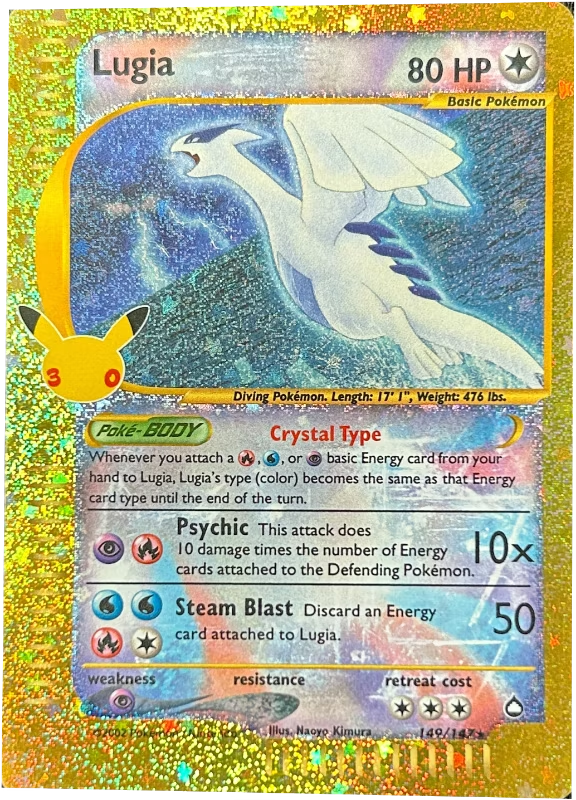
These views come from Lugia, shared by @pokedweeb. The crops show places to inspect; they are not labels asserting that this card has a particular defect. Open the original report to compare its findings with the complete front and back.
Try a tool or inspect a real report
Common questions
Can an app give my card an official grade?
GemiScan provides an AI condition estimate. It does not issue an official PSA, BGS or CGC grade or replace physical submission to a professional grading company.
Does perfect centering mean my card is a 10?
No. Centering is one component. Corner, edge and surface condition can lower the overall estimate even when the borders are balanced.
Why might a professional grade differ?
The company examines the physical card under its own criteria. Lighting, image quality, hidden damage and differences between grading systems can all contribute to a different result.
Can I calculate centering without uploading a photo?
Yes. The free centering calculator accepts border widths that you measure yourself. It calculates ratios without uploading a photograph or running an AI assessment.

Scanned with GemiScan
Grade your own cards free.